How to Automate a Jira Cloud Backlog Using APIs and Templates

Detailed guide:
This runbook explains how to automatically create a Jira Cloud backlog or board using the REST API and a file-versioned template.
The main benefit is simple: Jira supports advanced project templates, but that capability may depend on paid features or plans, such as Enterprise options or centralized template administration.
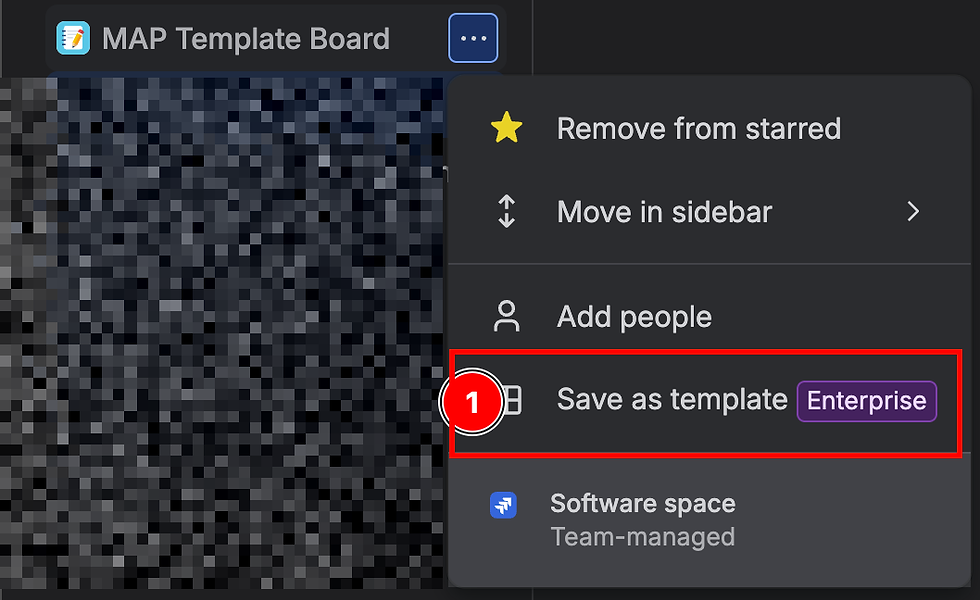
When a team does not have access to that feature, it can still automate a large part of the work using the Jira API, as long as the project and board already exist.
With this approach, the team defines the backlog once in a source file, reviews it in version control, runs a dry-run, and then creates the Epics, Tasks, Stories, and Subtasks in a repeatable way. This avoids manually loading dozens or hundreds of issues, reduces copy errors, maintains an auditable reference of the template, and makes it possible to reuse the same baseline across projects.
This mechanism is not intended to replace Jira Enterprise or formal Jira administration. It is a pragmatic alternative for automating the initial workload when a target Jira project already exists and the team has permission to create issues through the API.
What you gain
Create large boards/backlogs without manually loading issues one by one.
Version templates in Git or in a shared repository.
Review the content before making changes in Jira.
Create the Epics first and then the rest of the backlog while preserving parent relationships.
Retry a failed execution without duplicating issues that were already created.
Share reusable templates across teams without depending on a Jira Enterprise feature.
Maintain evidence of the mapping between Template ID and the actual Jira issue.
Use case
The flow creates issues in an existing Jira project:
Epics first.
Stories, Tasks, and Subtasks afterward.
Parent relationships between Epics and child tickets.
Parent relationships between Tasks/Stories and Subtasks.
Descriptions enriched with template metadata, acceptance criteria, Definition of Ready, Definition of Done, and original estimate.
Validated example:
Jira Cloud URL: https://example.atlassian.net
Project key: ABC
Project ID: 1234
Board ID: 1234
Project name: Example Template Board
Issues creados: ABC-1 a ABC-127
Jira prerequisites
Before running the script, a Jira administrator or owner must have the following prepared:
A target Jira project that has already been created.
A board associated with the project.
The required issue types, for example Epic, Task, Story, and Subtask
Permissions allowing the API token user to create issues.
A compatible hierarchy for associating Tasks/Stories with Epics through parent.
Required-field configuration compatible with the script's minimum payload.
The script does not replace Jira's initial administration. It automates loading the backlog/template into an existing project.
Minimum files
To run a new implementation, the following files are required:
create_jira_issues.py
validate_template.py
map_template.yaml
A local credential outside the repository is also required:
~/.jira/jira-template.env
Expected content:
JIRA_BASE_URL=https://example.atlassian.net
JIRA_API_TOKEN=token-atlassian
JIRA_PROJECT_KEY=ABC
Recommended permissions:
chmod 600 ~/.jira/jira-template.env
Kit distribution
To share this material as an internal Teratip, the runbook can be published as the main page and the compressed file can be attached:
ZIP password:
jira
The password prevents the contents from being extracted without knowing it. Depending on the ZIP tool used, file names may still be visible when listing the archive; therefore, the ZIP must not include tokens, credentials, customer data, or sensitive information.
The ZIP should contain only reusable material:
create_jira_issues.py
validate_template.py
map_template.yaml
template_source_example.md
For internal adoption, it is worth considering the creation of a company GitHub repository dedicated to Jira templates. This makes it possible to version improvements, receive pull requests, maintain examples by project type, and publish internal releases of the kit.
Recommendations for that repository
Use a private or internal repository if the content is for corporate use
Do not upload tokens, .env files, customer data, real projects, real users, or sensitive execution mappings.
Keep the runbook and scripts as reusable code.
Keep example templates with fictitious data.
Publish the ZIP as an internal release artifact if easier downloading is desired.
Recommended, but not required, files:
template_source_example.md
jira_create_results.json
jira_create_results.json is not the template source. It is the execution state and the mapping between Template ID and the actual Jira issue. It is used to continue with --skip-existing without duplicating issues.
Template source
The current structured source is:
map_template.yaml
Although the extension is .yaml, the file is written as JSON compatible with YAML. This avoids external dependencies such as PyYAML and allows deterministic validation using Python's standard library.
The script can also consume Markdown as a source if the file contains a fenced jira-template block:
```jira-template
{
"template_name": "Example",
"allowed_issue_types": ["Epic", "Story", "Task", "Sub-task"],
"allowed_applicability": ["Core", "Conditional", "Optional", "Not Applicable"],
"issues": []
}
```
For a complete and valid example, use:
template_source_example.md
Which file the user should create
The user can maintain the template in two ways.
Recommended option for real implementations:
map_template.yaml
This file is the main structured source. It is the most convenient format for automation, validation, change control, and repeatable execution.
Example:
python3 create_jira_issues.py --template map_template.yaml
Alternative option for documentation or training:
template_source_example.md
This format is useful when the template needs to be explained in natural language while keeping the structure inside a fenced jira-template block.
Example: Description of scope, conventions, and usage.
#Project template
Description of scope, conventions and usage.
```jira-template
{
"template_name": "project template",
"issues": []
}
```
Execution:
python3 create_jira_issues.py --template template_source_example.md
Do not use a visual Markdown file generated for human review as an automatic source. That type of file is useful as a board preview, but it is not a robust source for automation.
Create an API token
Go to https://id.atlassian.com/manage-profile/security/api-tokens
Create a token with a clear name, for example jira-template-import.
Copy the token only once.
Save it in ~/.jira/jira-template.env.
Do not commit the token to the repository.
The token does not create a persistent SSH-style connection. It is a reusable credential until it expires or is revoked. Each script execution uses it to authenticate against Jira.
Validate access
From the template folder:
python3 create_jira_issues.py --check
Expected output:
Project: ABC - Example Template Board
Issue types: Epic, Subtask, Task, Story, Feature, Bug
If it fails because of SSL certificates on macOS, use the certifi bundle:
export SSL_CERT_FILE="$(python3 -c 'import certifi; print(certifi.where())')"
python3 create_jira_issues.py --check
Dry-run
Before creating issues, always run:
python3 create_jira_issues.py
This prints the creation order without modifying Jira.
To review only the first 23 operations:
python3 create_jira_issues.py --limit 23
In the MAP template, those first 23 operations are the Epics.
Create Epics first
Create only Epics:
python3 create_jira_issues.py \
--execute \
--limit 23 \
--results jira_create_results.json
The result stores the mapping:
{
"TPL-01-EP": "ABC-1",
"TPL-02-EP": "ABC-2"
}
Review Jira before continuing. Confirm that the Epics are displayed correctly in the project/board.
Create the rest of the board
Once the Epics exist and the mapping has been saved:
python3 create_jira_issues.py \
--execute \
--skip-existing \
--results jira_create_results.json
--skip-existing loads the existing mapping and does not recreate Template IDs that have already been created. This allows the process to continue in two phases:
Create Epics.
Create Stories, Tasks, and Subtasks.
Retries
If an execution fails halfway through:
Do not delete jira_create_results.json.
Fix the problem.
Run again with:
python3 create_jira_issues.py --execute --skip-existing
The script will skip issues that have already been created and continue with the pending ones.
Use another project or template
Another project:
python3 create_jira_issues.py \
--project-key ABC \
--check
Another source file:
python3 create_jira_issues.py \
--template template_source_example.md
Use a separate results file for each project or customer:
python3 create_jira_issues.py \
--execute \
--results results-cliente-abc.json
Known limitations
The script creates issues; it does not create Jira projects or boards.
The user/API token needs Create Issues permission in the project.
Jira Cloud team-managed projects use parent to attach Stories/Tasks to Epics.
In company-managed projects, legacy behavior with Epic Link may exist; that case may require additional mapping of custom fields.
The script does not configure workflows, statuses, columns, permissions, sprints, or releases.
The original estimate is loaded into the description if Jira does not expose an editable native estimate field.
Components should only be sent with --components if they already exist in Jira.
Priority is only sent with --priority if the project accepts that field.
Community usage recommendations
Keep a base template without confidential data.
Create a copy per customer/project.
Use placeholders such as <CLIENT_NAME>, <PROJECT_NAME>, <ENVIRONMENT> and <TARGET_DATE>.
Run a dry-run and review the visual Markdown before creating issues.
Create Epics first and review them.
Create the rest with --skip-existing.
Keep the project's results.json as operational evidence, as long as it does not contain sensitive information.
Do not store tokens inside the repository.
Kit files
map_template.yaml - Example structured source
template_source_example.md - Example Markdown source
validate_template.py - Structural validator
create_jira_issues.py - Jira API executor
jira_create_results.json Actual Template ID -> Jira key mapping, generated during execution

Silvio Depetri
Cloud Engineer