Automation workflow to execute scripts on EC2 instances with SSM and Terraform

1. Introduction
This document describes how to use the SSM Cronjobs Terraform Module to define, deploy, and operate scheduled operational tasks on EC2/ECS hosts using:
SSM Documents (run shell scripts).
SSM Maintenance Windows (scheduling, orchestration).
Instance / resource targeting via tags.
This module is designed for:
Operational jobs (migrations, maintenance, cleanups).
Jobs that must run inside existing hosts or containers.
Jobs that must run in a specific order.
Jobs that should be auditable, observable, and controlled.
2. What Problem This Solves
Before this module:
Ad-hoc shell scripts.
Manual SSH or cron.
No ordering between steps.
No visibility in AWS.
No central scheduling.
With this module:
All jobs are:
Defined in Terraform.
Versioned.
Scheduled in AWS.
Logged in CloudWatch.
Controlled with concurrency, error thresholds, cutoffs.
3. High-Level Architecture
Each scheduled "cronjob" consists of:
One or more SSM Documents (shell scripts).
One SSM Maintenance Window (the scheduler).
One or more Maintenance Window Tasks.
Target selection via resource tags.
CloudWatch Logs.
Execution flow:
Maintenance Window triggers.
AWS selects instances matching tags.
Tasks run in priority order.
Each task executes an SSM Document.
Output goes to CloudWatch Logs.
4. Core Concepts
4.1 SSM Document
An SSM Document is basically a versioned shell script stored in AWS.
In our module, it is created like this:
module "doc_python_migrate" { source = "...//ssm/ssm_cronjob" name = "Doc-Run-Python-Migrate" commands = [ "#!/bin/bash", "echo hello" ] } |
This produces:
An SSM Document.
With hash & versioning.
And outputs:
document_name.
document_arn.
document_hash.
4.2 Maintenance Window (The Scheduler)
The actual cron/scheduler is an SSM Maintenance Window.
It defines:
When it runs.
In which timezone.
For how long.
How many concurrent targets.
How many errors are allowed.
4.3 Tasks (Steps)
Each Maintenance Window can have multiple tasks.
Each task:
References one SSM Document
Has a priority.
Runs in order.
This allows patterns like:
makemigrations.
migrate.
cleanup.
restart services.
5. Real Usage Pattern
5.1 Step 1 — Create Documents
Example: makemigrations
module "doc_python_makemigrations" { source = "...//ssm/ssm_cronjob" name = "Doc-Run-Python-MakeMigrations" commands = [ "#!/bin/bash", "echo Starting...", "docker exec ... python manage.py makemigrations" ] } |
Same for migrate.
5.2 Step 2 — Create the Scheduled Maintenance Window
module "boxer_pricing_updates_mw" { source = "...//ssm/ssm_cronjob" mw_name = "testing-example-mw-django-apply-migrations" mw_schedule = "cron(0 /4 ? )" mw_timezone = "America/Buenos_Aires" mw_duration = 1 mw_cutoff = 0 mw_max_concurrency = "2" mw_max_errors = "1" log_retention = "7" enabled = true target_tag_key = "Cluster_name" target_tag_value = "testing-example-cluster" ecs_task_name = "ecs-test-" tasks = [ { name = "python-makemigrations" document = module.doc_python_makemigrations.document_name arn = module.doc_python_makemigrations.document_arn hash_type = module.doc_python_makemigrations.document_hash_type hash = module.doc_python_makemigrations.document_hash priority = 0 }, { name = "python-migrate" document = module.doc_python_migrate.document_name arn = module.doc_python_migrate.document_arn hash_type = module.doc_python_migrate.document_hash_type hash = module.doc_python_migrate.document_hash priority = 1 } ] } |
6. Scheduling
Uses EventBridge-style cron:
cron(0 /4 ? ) # every 4 hours |
Timezone is configurable:
mw_timezone = "America/Buenos_Aires" |
7. Targeting Strategy
Instances are selected by tags:
target_tag_key = "Cluster_name" target_tag_value = "testing-example-cluster" |
Every instance with this tag will receive the command.
8. Execution Model
Tasks run in ascending priority
Each task runs on all matched instances
Controlled by:
mw_max_concurrency = "2" mw_max_errors = "1" |
If error threshold is exceeded → execution stops.
9. Logging & Observability
Output goes to CloudWatch Logs
Retention controlled by:
log_retention = "7" |
You can:
Audit every run.
See per-instance output.
Debug failures easily.
10. Enable / Disable
target_tag_key = "Cluster_name" target_tag_value = "testing-example-cluster" |
Disabling keeps infra but stops scheduling.
11. Common Use Cases
Django / Rails migrations.
Cleanup jobs.
Certificate rotation.
Cache warming.
One-click fleet operations.
Example usage with Terraform
Prerequisites
Terraform ≥ 1.3
AWS Provider ≥ v5.x
In order to use this solution, you can apply all this configuration using the following example code:
locals { ecs_task_name = "ecs-test-" environment = "testing" project = "example" } module "doc_python_makemigrations" { source = "git@github.com:teracloud-io/terraform_modules.git//ssm/ssm_document?ref=feature/ssm_cronjobs"
name = "Doc-Run-Python-MakeMigrations" commands = [ "#!/bin/bash", "echo \"Starting makemigrations run on $(hostname)\"", "FAILED=0", "CONTAINER_IDS=$(docker ps --filter \"name=${local.ecs_task_name}\" --quiet || true)", "if [ -z \"$CONTAINER_IDS\" ]; then", " echo \"No matching containers found\"", " exit 0", "fi", "echo \"Found container IDs: $CONTAINER_IDS\"", "for cid in $CONTAINER_IDS; do", " cname=$(docker inspect --format '{{.Name}}' \"$cid\" | sed 's#^/##')", " echo \"---Executing inside container: $cname ----\"", " docker exec \"$cid\" bash -lc 'cd /app/src && python3 manage.py makemigrations'", " RC=$?", " if [ $RC -eq 0 ]; then", " echo \"OK\"", " else", " echo \"FAILED\"", " FAILED=1", " fi", " echo \"Command exit code for $cname: $RC\"", "done", "echo \"Completed makemigrations run on $(hostname)\"", "exit $FAILED" ] } module "doc_python_migrate" { source = "git@github.com:teracloud-io/terraform_modules.git//ssm/ssm_document" name = "Doc-Run-Python-Migrate" commands = [ "#!/bin/bash", "echo \"Starting migrate run on $(hostname)\"", "FAILED=0", "CONTAINER_IDS=$(docker ps --filter \"name=${local.ecs_task_name}\" --quiet || true)", "if [ -z \"$CONTAINER_IDS\" ]; then", " echo \"No matching containers found\"", " exit 0", "fi", "echo \"Found container IDs: $CONTAINER_IDS\"", "for cid in $CONTAINER_IDS; do", " cname=$(docker inspect --format '{{.Name}}' \"$cid\" | sed 's#^/##')", " echo \"---Executing inside container: $cname ----\"", " docker exec \"$cid\" bash -lc 'cd /app && python3 manage.py migrate'", " RC=$?", " if [ $RC -eq 0 ]; then", " echo \"OK\"", " else", " echo \"FAILED\"", " FAILED=1", " fi", " echo \"Command exit code for $cname: $RC\"", "done", "echo \"Completed migrate run on $(hostname)\"", "exit $FAILED" ] } module "example_maintenance_window" { source = "git@github.com:teracloud-io/terraform_modules.git//ssm/ssm_cronjob" mw_name = "${local.environment}-${local.project}-mw-django-apply-migrations" mw_description = "Maintenance window to apply missing migrations to Django app" mw_schedule = "cron(0 /4 ? )" mw_timezone = "America/Buenos_Aires" mw_duration = 1 mw_cutoff = 0 mw_max_concurrency = "2" mw_max_errors = "1" log_retention = "7" ecs_task_name = local.ecs_task_name enabled = true target_tag_key = "Cluster_name" target_tag_value = "${local.environment}-${local.project}-cluster" tasks = [ { name = "python-makemigrations" document = module.doc_python_makemigrations.document_name arn = module.doc_python_makemigrations.document_arn hash_type = module.doc_python_makemigrations.document_hash_type hash = module.doc_python_makemigrations.document_hash priority = 0 }, { name = "python-migrate" document = module.doc_python_migrate.document_name arn = module.doc_python_migrate.document_arn hash_type = module.doc_python_migrate.document_hash_type hash = module.doc_python_migrate.document_hash priority = 1 # Runs AFTER makemigrations } ] } |
You can also adjust the commands parameter to implement a bash script that suits your needs or simply modify the string between ‘’ in the “docker exec” line.
This code will create the following resources in AWS.


This code assumes that you already have EC2 instances running with ECS or docker containers running inside. That instances must have Tags aligned with what is configured in Terraform code in this section
module "example_maintenance_window" { ... target_tag_key = "Cluster_name" target_tag_value = "${local.environment}-${local.project}-cluster" ... |
When the execution schedule of the maintenance window is reached, it will execute all documents in the given order defined in the code with the given priority.
Once executed, we can check historical executions in the “History” tab of the maintenance window.

There we can check for details of each execution, and check related logs.
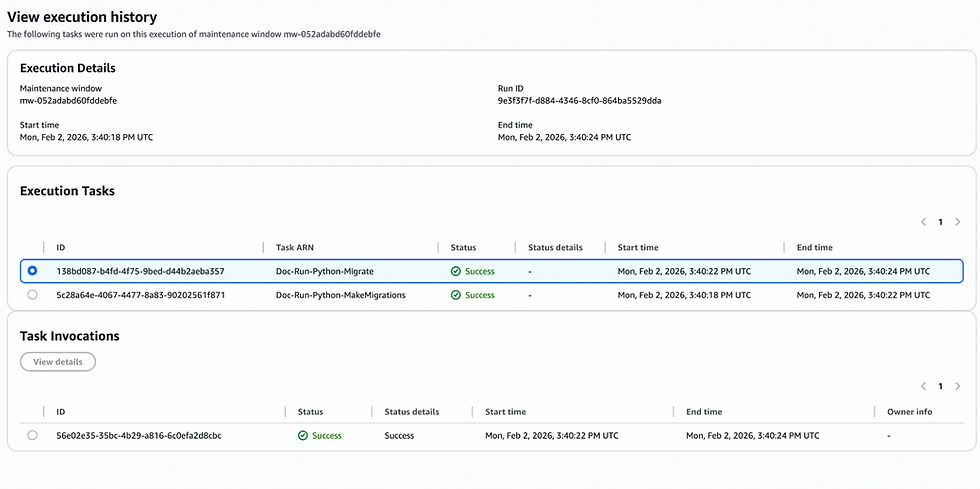


And for example, if there is an error, it throws message like this and stops the execution:


That’s it! You have now automated the creation and deletion of a fully functional workflow to automate the execution of tasks or scripts across multiple instances hosting multiple containers, on a defined schedule and with fine-grained threshold controls for errors and success.

Joaquín San Román
Cloud Engineer